



Cyberattacks move quickly, and businesses no longer have days to discover that something is wrong. Attackers can gain access, steal credentials, and move through a network in minutes. That makes incident response speed one of the most important factors when choosing a cybersecurity partner. A strong Managed Security Services Provider (MSSP) should detect threats quickly, investigate alerts with experienced analysts, and contain damage before it affects daily operations. This guide explains the incident response speed benchmarks organizations should expect and the questions to ask before trusting a provider with their security.
Quick Answer: How Fast Should Incident Response Be?
A strong MSSP should detect suspicious activity within minutes, begin investigating critical security alerts within one to two hours, and start containment as quickly as possible after confirming a threat.
The exact timeline depends on the severity of the incident, but businesses should expect:
- 24/7 security monitoring
- Clear response time commitments
- Human investigation of important alerts
- Fast containment when a threat is confirmed
- Regular reporting on security performance
A provider that cannot explain how quickly they respond may not be prepared for a real attack.
Why Incident Response Speed Matters More Than Ever
Attackers have never moved this fast. The CrowdStrike 2026 Global Threat Report found that average breakout time, which is the gap between an attacker’s first access and their jump to a second system, fell to just 29 minutes in 2025. The fastest case on record took 27 seconds. In one intrusion, criminals began stealing data within four minutes of getting in.
Now look at the other side of the fight. IBM’s Cost of a Data Breach Report puts the average time to find and contain a breach at 241 days. That figure is the best it has been in nine years, and it still works out to about eight months. The same research found the average breach costs $4.44 million worldwide.
That gap tells the whole story. Attackers work in minutes. Many defenders work in months. Closing the gap is the core job of incident response, and it’s the main reason businesses bring in a managed security services provider in the first place.
What Happens During Incident Response?
Incident response is not just sending an alert or creating a ticket. A complete response process includes several important steps.
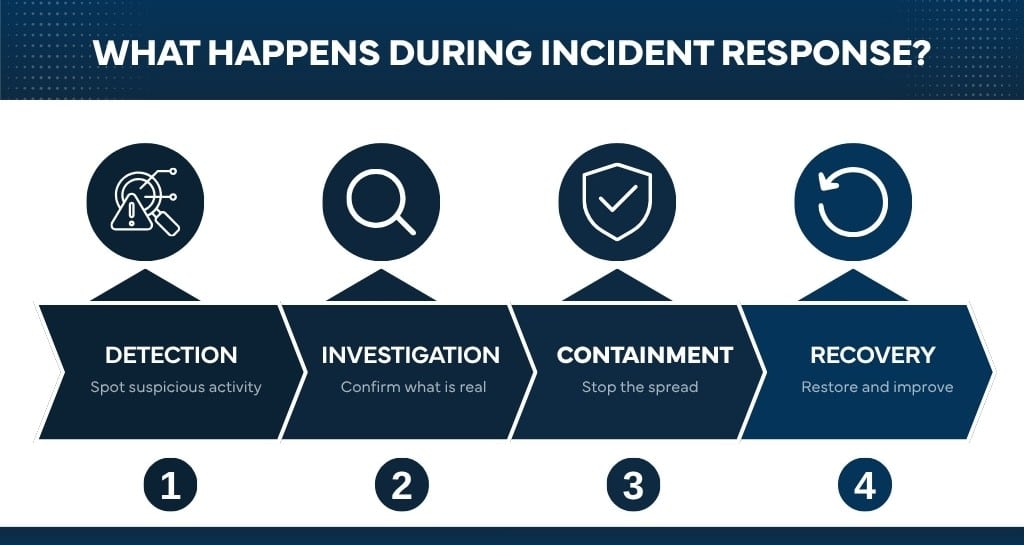
1. Detection
The first step is identifying suspicious activity.
This could include:
- Unusual login attempts
- Malware activity
- Suspicious file changes
- Unauthorized access
- Data movement
Detection depends on continuous monitoring and the ability to recognize activity that does not match normal behavior.
This is why organizations often rely on a Security Operations Center (SOC) instead of only internal IT teams. A SOC provides ongoing monitoring and security expertise that is difficult for many businesses to maintain alone.
Vancord’s Security Operations Center combines security technology with experienced analysts who investigate threats and help organizations respond quickly.
2. Investigation
Not every alert is a real attack.
Security analysts must determine:
- Is this activity malicious?
- What systems are affected?
- How did the attacker gain access?
- What information may be at risk?
This step requires more than automated tools. Technology helps identify possible problems, but experienced analysts provide the investigation and decision-making needed during a real incident.
3. Containment
Containment focuses on stopping the attack from spreading.
Depending on the situation, this may involve:
- Isolating infected devices
- Disabling compromised accounts
- Blocking malicious connections
- Removing attacker access
The faster containment happens, the smaller the impact usually becomes.
4. Recovery and Improvement
After the immediate threat is handled, organizations need to understand what happened and how to prevent similar incidents.
This may include reviewing security controls, improving policies, and testing response plans.
The Three Incident Response Metrics Every Business Should Understand
When people ask how fast incident response should be, they’re really asking about three separate clocks. Each one starts at a different moment, and each one tells you something different about how well protected you are.
Mean Time to Detect (MTTD)
Mean Time to Detect measures how long it takes to identify a security issue after it begins.
A shorter MTTD means threats are discovered earlier.
For example, if an attacker gains access at midnight but nobody notices until the following afternoon, the attacker has many hours to continue exploring the environment.
Continuous monitoring helps reduce this window.
Mean Time to Respond (MTTR)
Mean Time to Respond measures how quickly security teams begin investigating after identifying a potential threat.
A fast response does not mean simply sending an automated notification.
It means someone is actively reviewing the situation and deciding what action should happen next.
For critical incidents, businesses should expect a provider to begin investigation quickly, not leave alerts waiting in a queue.
Mean Time to Contain (MTTC)
Mean Time to Contain measures how long it takes to stop the threat from continuing.
Containment is where response speed directly affects business impact.
Stopping an attacker after one compromised device is very different from stopping them after they have accessed multiple systems.
Response Time Benchmarks Your MSSP Should Meet
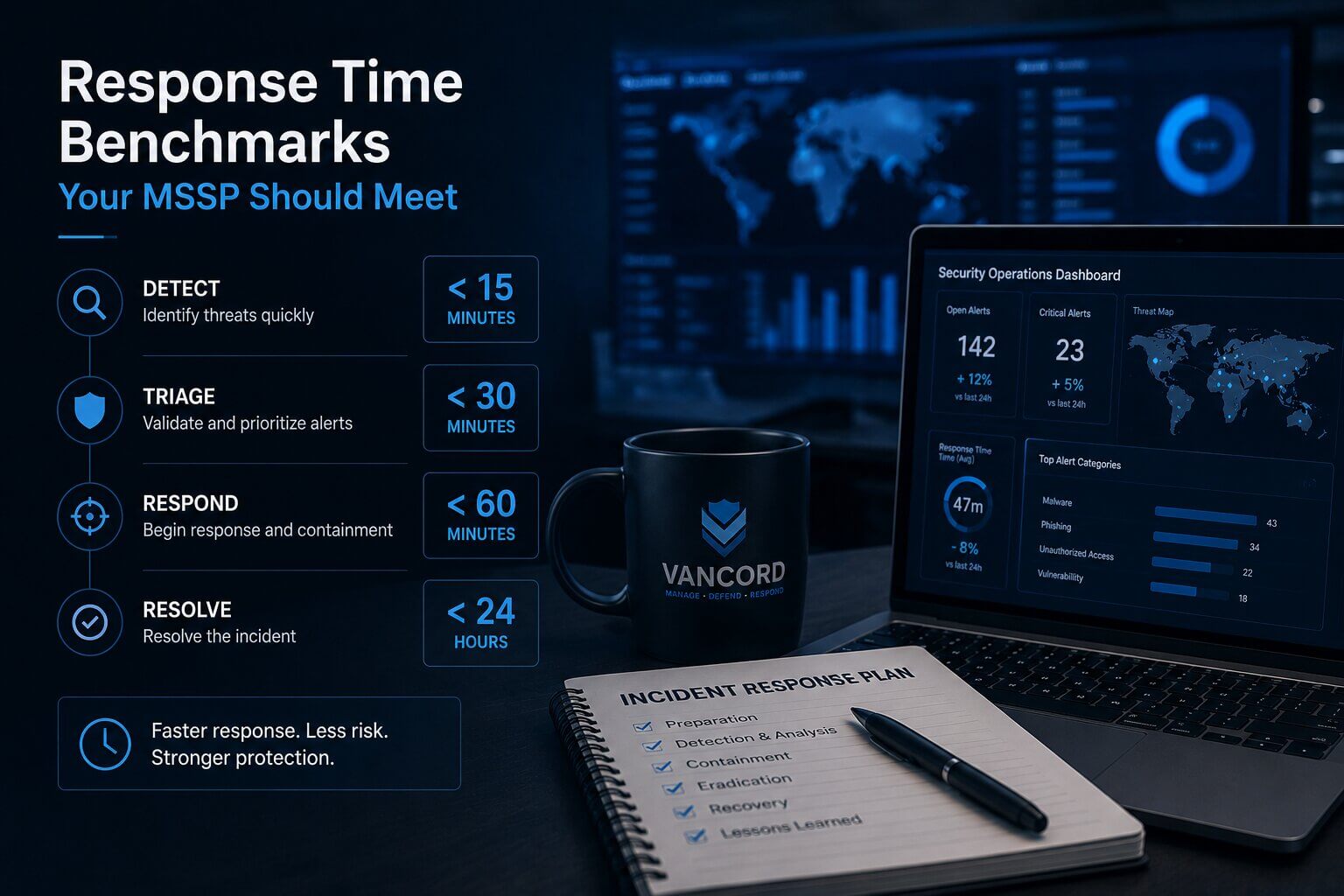
Start with the entry ticket: 24/7 coverage. Attacks don’t wait for business hours, so 24/7 managed security monitoring is the baseline, not a bonus feature. If your provider goes quiet on weekends, you have a part-time defense against a full-time threat.
From there, look for response times tied to severity. For critical alerts, a good MSSP should have an analyst engaged within one to two hours at most, day or night. At Vancord, our service level agreements commit us to responding to critical alerts within 2 hours, medium alerts within 8 hours, and low-priority alerts within 24 hours. Those numbers are published and tracked, which is exactly what you should expect from any provider you consider.
Containment deserves its own benchmark. Serious threats should be isolated in hours, not days. Our security automation isolates affected machines within 4 hours for critical events, which shuts down an attacker’s room to move while analysts finish the investigation.
Some security teams also aim at CrowdStrike’s well-known 1-10-60 rule: detect a threat in one minute, understand it in ten, and contain it in sixty. Not every organization hits those marks every time, but the rule points in the right direction. The real question isn’t whether your provider is perfect. It’s whether they measure speed at all, and whether they’ll show you the numbers.
Internal IT Team vs MSSP Response Time
Many businesses rely on internal IT teams for security. While internal teams are valuable, there are differences between IT support and dedicated security operations.
| Internal IT Team | MSSP Security Team |
|---|---|
| Often focused on daily operations | Focused on security monitoring |
| Usually business-hour availability | 24/7 monitoring options |
| Limited security resources | Dedicated analysts |
| May investigate after an issue occurs | Proactive threat detection |
The strongest approach is often collaboration between internal teams and an MSSP.
The MSSP provides security monitoring and expertise, while internal teams provide business knowledge and system ownership.
Five Signs Your MSSP Response Time Is Too Slow
A cybersecurity provider may not be meeting expectations if:
- Alerts are reviewed only during business hours.
- Response times are not included in agreements.
- Your team receives alerts but no guidance.
- Nobody can explain who investigates incidents.
- The provider does not report security performance.
A good security partner should make response processes clear before an incident happens.
What Slow Incident Response Looks Like in Real Life
Speed can feel like a numbers game until an attack lands. One public sector organization we worked with learned that firsthand when ransomware spread across hundreds of workstations and servers. The internal team tried to fight it off and couldn’t. Normal business stopped, email went down, and the organization’s reputation and funding were on the line.
Vancord was brought in through a referral and put three engineers on the problem full time to contain the attackers, remove their tools, and bring systems back to normal operation. They recovered, but the lesson stuck. Once an attack outruns your team, the outcome depends on how quickly skilled containment and restoration work can begin. The organizations that do best line up that capability before they need it.
Questions to Ask Your MSSP About Response Times
You don’t need to be a security expert to pressure-test a provider. A few direct questions will tell you most of what you need to know:
- What are your response times for critical, medium, and low alerts, and are they written into the contract?
- Do you provide 24/7 monitoring?
- Is your security operations center staffed by your own analysts overnight and on weekends?
- Once a critical threat is confirmed, how quickly do you isolate the affected machine?
- Who handles containment, your team or ours?
- How do you report your actual response times?
- What happens if you miss a target?
- Can you test our incident response plan?
A confident provider answers these without hesitation and backs the answers up in writing. Vague replies are their own kind of answer. Response speed is also one of the clearest ways to judge whether a managed security service provider is worth the cost, because it’s a promise you can measure month after month.
Fast Response Starts Before the Incident
Here’s a truth worth sitting with: part of your response speed comes from your side of the table. A written incident response plan, a current contact list, and clear decision-making authority all shave hours off a real event. So does practice. Running tabletop exercises once or twice a year turns your plan from a document into a habit, and habits are what hold up at 3 a.m. when the phone rings.
Frequently Asked Questions About Incident Response Speed
What is a good incident response time?
For critical threats, an analyst should be actively responding within one to two hours, with containment underway within a few hours after that. Anything measured in days leaves attackers far too much room.
What is breakout time?
Breakout time is the gap between an attacker’s first access and their move to a second system on your network. The current average is about 29 minutes, which is why detection and response now have to happen in minutes and hours rather than days.
What is MTTD in cybersecurity?
MTTD stands for Mean Time to Detect. It measures how long it takes to discover suspicious activity after an attack begins.
What is MTTR in cybersecurity?
MTTR usually refers to Mean Time to Respond. It measures how quickly security teams begin investigating after detecting a potential threat.
How fast should ransomware be contained?
Affected machines should be isolated within hours of confirmation. Automation helps here, since it can cut off an infected computer right away instead of waiting for a person to log in and do it by hand.
Do response time SLAs really matter?
Yes. A service level agreement turns a sales promise into a commitment you can measure. If a provider won’t publish response times or report against them, you have no way to know how fast they really are.
Get a Response Plan Before You Need One
The best time to check your response speed is before anyone attacks you. Vancord’s incident response services and 24/7 security operations center are built around published response times you can hold us to. Talk with our team about where your current response times stand, or request a security assessment and we’ll walk you through our SLAs and where your gaps are.